
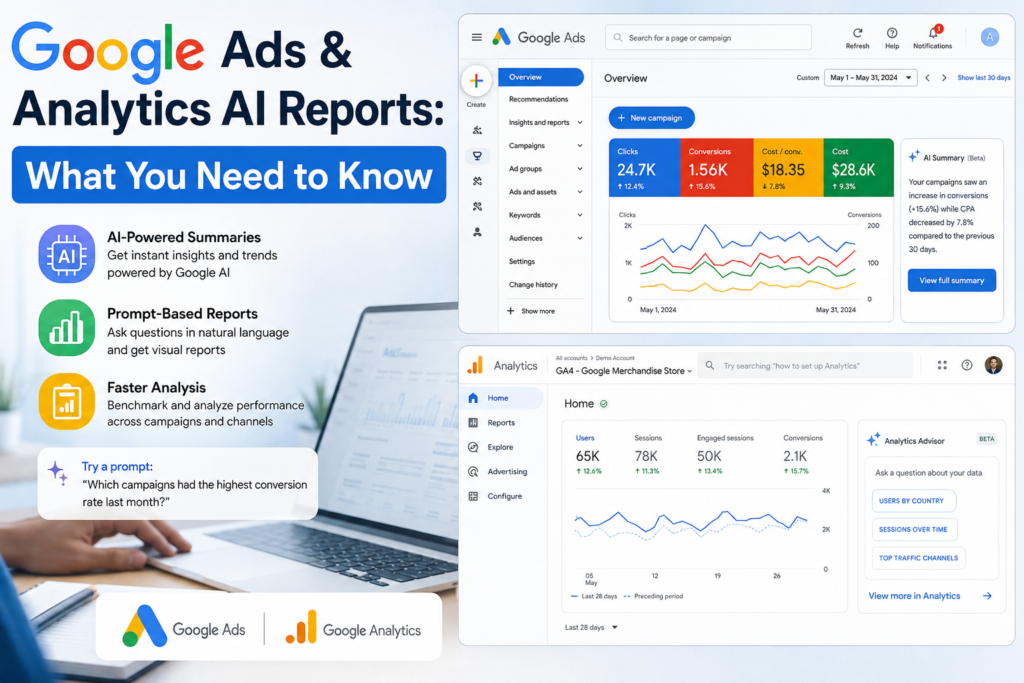

Google introduced automated AI-powered summaries and visual reports.
Google has added new AI features to the homepages of Google Ads and Analytics. These Gemini-powered tools make it easier to understand marketing data without spending a lot of time checking reports.
The AI can summarize your performance, spot important trends, and create visual reports from simple text prompts. It can also compare your results with anonymous industry data, helping you see how your business is performing compared with similar businesses.
The bigger shift is simple: instead of manually searching through marketing data, teams can increasingly ask Google AI what is happening and what they should investigate next.
What Are Google Ads and Analytics AI-Powered Reports?
Google is bringing more conversational AI into its advertising and analytics products through tools such as Ads Advisor, Analytics Advisor, and Google Ads and Analytics Report Generator.
These tools are designed to turn complex marketing data into easier-to-understand answers, summaries, insights, and visual reports. Google says Analytics Advisor can provide performance insights and visualizations, while Ads Advisor can analyze campaign performance and recommend next steps.
Google Ads also offers a Report Generator that uses Google AI to build campaign performance reports from natural-language prompts. For example, an advertiser can ask which campaigns had the highest conversion rates last month or request metrics such as cost, clicks, conversion value, and conversion rate by campaign type.
Key Features of Google Ads & Analytics AI Reporting
- AI-Powered Performance Summaries – Get quick, easy-to-understand summaries of campaign and website performance.
- Prompt-Based Report Generation – Create reports by simply asking questions in natural language.
- Visual Report Creation – Turn marketing data into charts and visual reports without manually building dashboards.
- Automated Trend Detection – Identify important changes, trends, and performance opportunities faster.
- Natural-Language Analytics – Ask questions about campaigns, conversions, traffic, and user behavior without complex filters.
- Campaign Benchmarking – Compare current performance with previous periods to understand growth or decline.
- Actionable Insights – Discover potential issues and areas that may need optimization.
- Faster Decision-Making – Reduce manual data analysis and help marketing teams act on insights sooner.
- Cross-Platform Marketing Insights – Connect advertising and analytics data to get a broader view of performance.
- AI-Assisted Marketing Workflow – Use AI as a research and analysis assistant while keeping human marketers in control.
Why Is Google Adding AI to Google Ads and Analytics?
Marketing data has become much more complicated.
A typical team may need to monitor:
- Impressions and clicks
- Conversion rates
- Cost per conversion
- Revenue and conversion value
- Campaign performance
- User behavior
- Audience trends
- Landing-page performance
- Geographic performance
Finding the important pattern in all this data can take time.
Google’s AI advisors are designed to reduce that manual work. Analytics Advisor can identify trends that marketers may not have specifically searched for, while Ads Advisor can help identify campaign issues and explain possible causes.
The goal is not simply to create another chatbot. Google describes these tools as agentic collaborators that help bridge the gap between understanding what happened and deciding what to do next.
How Do AI-Powered Google Ads and Analytics Reports Work?
The basic idea is straightforward: ask a specific question about your campaign data.
Instead of manually selecting dimensions, metrics, filters, and date ranges, you can use a prompt such as:
“Which Search campaigns had the highest conversion rate last month?”
Google Ads can use that request to generate a relevant report.
You can also ask for specific metrics:
“Show cost, clicks, conversion value and conversion rate by campaign type.”
Or ask a broader performance question:
“Where is my performance dropping?”
Google recommends including the date range and the specific metrics you want. More detailed prompts generally make it easier for the system to create a useful report.
Example Prompt : Google Ads and Analytics
Imagine an online store spent $10,000 on Google Ads last month.
Instead of opening multiple reports, a marketer could ask:
“Compare my campaigns from July and August. Show spend, conversions, conversion rate, CPA and conversion value, and identify the biggest performance changes.”
The resulting report can help the marketer quickly identify which campaigns deserve attention.
What Are the Benefits of AI-Powered Google Ads and Analytics Reports?
1. Faster Performance Analysis
The biggest advantage is speed.
A marketer can ask a question directly instead of spending several minutes navigating reports and filters.
For busy marketing teams, saving small amounts of time across dozens of weekly tasks can become significant.
2. Easier Data Analysis for Non-Experts
Not every business has a dedicated data analyst.
Natural-language prompts make analytics easier for business owners, content teams, SEO professionals, and junior marketers who may not know every reporting feature.
3. Faster Trend Discovery
AI can help surface patterns that might otherwise be overlooked.
Google says Analytics Advisor can proactively identify new trends and insights rather than waiting for users to search for them.
4. Visual Understanding
Numbers are useful, but visual reports can make trends easier to understand.
Charts and visualizations can help teams quickly spot:
- Rising or falling conversions
- Campaign differences
- Traffic changes
- Performance trends
- Audience behavior
5. Better Marketing Decisions
The real value is not the report itself. The value comes from what the team does with the information.
If AI identifies a campaign with falling conversion performance, the marketer can investigate the landing page, audience, search terms, budget, creative, or tracking setup.
What Does This Mean for the Future of Marketing Analytics?
Google’s updates point toward a broader change in digital marketing.
Traditional analytics often starts with:
Dashboard → Filter → Report → Analysis → Decision
AI-powered analytics moves toward:
Question → AI analysis → Insight → Action
That does not mean dashboards will disappear.
Instead, AI can become a faster layer on top of existing marketing data. Teams can use conversational questions for quick analysis while still using detailed reports when they need deeper investigation.
Google is also connecting more marketing tools around AI. Its Ask Advisor experience is designed to connect marketing data across Google Ads, Analytics, and Merchant Center, giving marketers a more unified AI-assisted workflow.
This reflects Google’s larger push toward AI-powered marketing intelligence, rather than simple automation.
What Should Marketers Do Now?
Start with simple, repeatable questions.
Choose a few weekly reports that your team normally creates manually. Turn those reports into clear natural-language prompts and compare the AI-generated results with your existing analysis.
Most importantly, verify important conclusions before making major budget or campaign decisions.
AI can speed up analysis, but marketers still need to understand the business context, tracking quality, attribution, and campaign goals.
Google itself recommends treating AI advisors as collaborators and using your own expertise when evaluating their recommendations.
Conclusion: Google Ads and Analytics Are Becoming More Conversational
Google’s AI-powered reporting tools are changing how marketers interact with performance data.
Instead of spending hours navigating dashboards, teams can increasingly ask direct questions, generate reports, identify trends, and explore visual insights using natural language.
The most important takeaway is simple: AI does not make marketing data less important—it makes the ability to ask the right questions more important.
For advertisers and analytics teams, learning how to write clear prompts, verify AI insights, and turn data into action could become a valuable marketing skill in 2026 and beyond.
FAQs
1. What is Google Ads AI Report Generator?
Google Ads Report Generator is an AI-powered feature that creates campaign performance reports from natural-language prompts. You can ask about metrics, campaigns, trends, date ranges, and performance changes.
2. What is Analytics Advisor in Google Analytics?
Analytics Advisor is Google’s conversational AI experience in Google Analytics. It can answer questions about performance, identify trends, and provide insights and visualizations from analytics data.
3. Can Google AI create visual marketing reports?
Yes. Google Analytics’ AI experiences can provide insights and visualizations, while Google is increasingly adding AI-assisted reporting and analysis capabilities across its marketing products.
4. What is the best prompt for Google Ads reporting?
A strong prompt includes a date range, campaign scope, metrics, and the question you want answered. For example: “Compare my Search campaigns over the last 30 days by spend, conversions, CPA and conversion value.”
5. Will AI replace marketing analysts?
Not completely. AI can automate parts of data analysis and reporting, but human marketers still need to validate results, understand business context, choose strategies, and make important decisions.


